


One family of applications for writing, delivering and reading technical documentation. GALILIX is built around MIL-STD, S1000D and DITA, works entirely with no network, and includes modules for translation, fault isolation and wiring, based on Smart Automation.
Text description of the video
The video has no sound. It shows the maintenance manual of a demo product, a gear pump by the fictional company "GALILIX Pumps Ltd.": first in GALILIX Editor, where the manual is written and managed, then in GALILIX Viewer, as the technician reads it.
- 0:00 The project in GALILIX Editor. The Pump Maintenance Manual project opens. The project tree holds the topics by chapter, the skins, the publishing targets (Viewer, Web, Print, Word, PowerPoint), the table of contents and the translation term base. The Acronyms and Abbreviations page is filled from the project register.
- 0:30 A topic and its tools. The topic "Gear Pump - Sectioned View (2D)" with its illustration, whose part numbers are links. The Import tab (Word, RapidAuthor and other sources) and the Translation tab (term base, translation memory, sending to a translator).
- 0:50 DMRL. The project's data module list: 28 data modules, each with its code, title and roles.
- 1:00 Common information repository. Reusable records by type: warnings and cautions, materials, parts with their part numbers, acronyms. The acronyms are shown translated into Hebrew.
- 1:40 Illustrations and project check. The register of illustrations with their codes and the topics that use them, and the Project Analyzer: every resource file, where it is and whether it is in use.
- 2:00 Writing check and publishing. A check of the wording against Simplified Technical English, and the publishing targets: what each output will contain, for example a PowerPoint presentation built from the topics.
- 2:30 GALILIX Viewer. The entry page: "Gear Pump", a 3D model of the pump and a role list. The 2D sectioned view: clicking a part name in the text finds it in the illustration. 3D sectioning: the model is turned and cut open, and the parts named in the text light up in it.
- 3:00 Fault isolation. The symptom: the pump does not run when switch S1 is set to ON. The steps run beside the fault tree; each Yes or No answer moves along the tree, and the wiring drawing shows the point to check, up to step 11: replace power supply PS1.
- 3:30 Test and disassembly. An outlet pressure test with what is normal and abnormal for each check. Then a disassembly procedure imported from RapidAuthor: numbered steps beside an animated 3D model, the current step highlighted.
- 3:50 Wiring. The pump harnesses page: equipment, harness and wire lists beside the drawing. Choosing a connector or a harness lights it on the drawing; harnesses W2 and W4 are traced together.
- 4:30 Parts and storage. The illustrated parts list beside the 3D model, with a part lit after a click. The packaging, handling and storage procedure, and the index of terms marked in the manual.
- 5:00 Pages and languages. The list of effective pages with every data module code, the role list on the entry page (All, Crew, I-Level, O-Level), and the same manual in Hebrew and in French.
What GALILIX does differently
Technical literature for complex systems is written today in several separate tools: an authoring tool, a component management system, a publishing tool, 3D, wiring drawings and a separate reader. Most advanced tools rely on the cloud, while many customers work on disconnected networks. Information is lost between the tools, and every update is carried by hand through several places.
- Everything on the customer’s computer, also on a disconnected network. Authoring, publishing, the reader and AI run locally, and nothing leaves the computer.
- One source, many outputs. The same content is published to a website, to GALILIX Viewer, to a printed PDF and to DITA. Export to S1000D is in development.
- The standards at the base. DITA, S1000D and MIL-STD-40051 are built into the model itself, not added as an extension or an export.
- All content sources in one project. Content written in GALILIX, Word documents, wiring drawings and wiring tables, and RapidAuthor 3D, side by side, and every topic remembers where it came from.
- The knowledge reaches the technician in the field. The reader delivered to the customer searches, answers questions, builds work lists and lights wiring paths, rather than only showing pages.
GALILIX components
Three applications and two modules.
-

GALILIX Editor
The authoring and publishing application. A project holds topics, drawings, fault trees, checklists, wiring and a common information repository; Word documents, wiring tables and RapidAuthor packages are brought in beside what is written in place. One project publishes a web manual, PDF, Word, DITA and a sealed GALILIX production for GALILIX Viewer.
-

GALILIX Viewer
Reads GALILIX productions: the manual as it was published, its table of contents, its search and its ChatBot, in the reader's language. A production opens sealed — nothing in it can be changed — and nothing is installed on the computer.
-

GALILIX AI In development
The local language-model tools of GALILIX. They will run on the computer they are installed on: no content, question or file will leave it.
Modules
-
Interactive fault isolation module
The technician is guided one step at a time through the fault tree, and each step can open the wiring drawing with the path to check marked on it.
-
Interactive wiring module
A wiring drawing the reader can trace pin to pin, and from which a fault tree can be built along a path on the drawing.
-
S1000D module In development
Will keep the data module requirement list (DMRL), the common information repository (CIR) and the illustration register (ICN) inside the project, and produce data module (DM) files from what was written.
-
Translation module
A term base and a translation memory inside the project, with sending to a translator and bringing the work back. Every translation is tied to the source version it was made from; when the source has changed since, this is reported before publishing.
-
STE module
Writing and checking by Simplified Technical English: words outside the approved dictionary and sentences that are too long are marked while writing, and again in the check before publishing.
-
RapidAuthor module
Brings RapidAuthor deliverables into the project: an animated procedure is shown step by step beside its animated model, and an illustrated parts list sits beside the 3D model; clicking a step or a part lights it in the model. The content is not edited, only styled.
From the source to the reader
Every production goes through the same six stages, from import to reading in the field.
-
Import
Word, HTML, other authoring tools, RapidAuthor, wiring drawings and wiring tables come into the project, each topic recording its source.
-
Authoring
Structured topics by type. Tools, materials, warnings and terms are drawn from shared repositories.
-
Checks
A pre-publish check finds broken links, topics outside the table of contents and fault trees with dead ends.
-
Publication
From one project: a web manual, PDF, Word, DITA and a sealed GALILIX production.
-
Delivery
One file with a fingerprint for every file inside, or volumes for removable media with a verification script.
-
Reading
GALILIX Viewer opens the production sealed, with nothing installed: the manual, its search and its ChatBot, in the reader’s language.
Knowledge base for the reader
The reader types a question in free language in GALILIX Viewer and gets the passages of the manual that answer it. Clicking a passage opens the topic and highlights the relevant step.
- The answer is passages of the published content, always with a reference to the source. The system does not write new text.
- The search starts in the chapter the reader is in, and can be filtered by system model.
- In a multi-volume production, the system shows which volume holds the answer.
- Everything runs inside the production file, on the reader’s computer, with no network. The index is built at publication.
- Search by meaning: in English. In Hebrew: word search, with search by meaning in development.
Interactive fault isolation
The technician is guided one step at a time. Answers are shown as buttons, and a step can be undone, the procedure restarted, and the path taken so far shown.
- Every step can open the wiring drawing, with the path to check marked on it.
- Before publication the tree is checked as a whole graph: an answer that leads nowhere, a repair action that cannot be reached, a step with no exit, a path that does not end in a repair action, and a loop with no way out. A faulty tree is not delivered to the reader.
- Numbering follows MIL-STD-40051. The fault index and the symptom index are generated automatically.
- Export of the tree to an S1000D fault data module is in development.
- Works in GALILIX Viewer and in an HTML site opened from disk, with no network.
An interactive demo runs here: the technician answers one question at a time, the wiring drawing lights the point to check, and the session is recorded until the cause and its corrective action are reached.
Content types and import
Topic types
Procedure (maintenance, removal and installation, test) · fault isolation · checklist · wiring data (interactive drawing, wire, connector and equipment lists) · illustrated parts catalog · system description · training lessons.
Shared repositories
Tools, materials and parts · warnings and cautions · terms and abbreviations · fault codes · units of measure · reusable text. Every item is managed once and inserted wherever it is needed.
A central topic list (DMRL) sets the table of contents. Variables and conditions show content by model or by audience.
Import
Word documents · HTML pages · projects from other authoring tools · DITA projects from other tools · RapidAuthor packages · wiring drawings · wiring tables from a spreadsheet or a CSV file · technical illustrations from CAD tools · e-learning courses, as published · translation memories (TMX, XLIFF).
Every import first shows what will come in, and only then are the files written. Every topic keeps its source. A project is written in DITA 1.3 (the default) or in structured HTML, and a whole project can be converted from one form to the other.
Publication formats
From one project you publish:
- Web manual
- Word
- DITA
- Signed GALILIX production (.gccmsv) for GALILIX Viewer
From wiring: wiring drawing, connection list, equipment list, wire list and harness list. Export of S1000D data modules for fault isolation and for checklists is in development.
Translation: the project goes to the translator as an XLIFF file and comes back into it. The translation memory is kept and moves between projects as TMX, and the terminology base as TBX.
Languages: write and publish in any language, including right-to-left Hebrew and Arabic, with a content tree for each language. In the reader, the interface, the search and the ChatBot work in eight languages: Hebrew, English, Arabic, German, Spanish, Romanian, Hindi and Chinese.
Standards
| Standard | Issue | What GALILIX does with it | How it is checked |
|---|---|---|---|
| DITA | 1.3 | The project’s source format | GALILIX checks the structure on every save and publishes with its own publishing engine |
| S1000D | Issue 7.0 | The project skeleton: DMRL, CIR and ICN. Data module export is in development | — |
| MIL-STD-40051 | — | Fault isolation numbering, and checklist rules | Automatic numbering checks |
| MIL-STD-38784 | — | Style rules on Word import, and Word templates in Hebrew and English | Import tests |
| STE | — | Word-level checking, STE-compatible | — |
Full S1000D (CSDB and publication module), ATA iSpec 2200 and SCORM: Galili produces to them through RapidAuthor and Xignal.
Security and local installation
- Installation: one installer for 64-bit Windows, which carries everything the software needs. Installation needs no internet, and a new version installs over the previous one and keeps the license. GALILIX Viewer needs no installation.
- Network: the software does not go out to the network. There is no usage data collection and no automatic update, and the software blocks every outgoing connection. License activation also works with no network.
- Data: everything is kept in the project folders on the organization’s disk. A diagnostic log for support hides names and paths, and is handed over manually.
AI: the rules
GALILIX AI, in development, will add the local language-model tools. The reader’s ChatBot in GALILIX Viewer also runs on a local model: it finds existing passages in the production and returns them with a reference.
The rules:
- Everything runs on the computer the component is installed on. No content, question or file leaves it.
- The component is optional. Without it, GALILIX is a complete product.
- Every text the machine wrote is checked: its numbers (values, torques, dimensions) must be identical to the source.
- The writer approves every change. The machine suggests; it does not decide.
What is special about GALILIX
Wiring: from the drawing to fault isolation
- A wiring drawing or wiring table becomes live information. The technician clicks a connector and sees its pin table; after a click on a pin, the conductor lights up in the drawing and in the tables, end to end, also through mating connectors.
- A fault isolation topic is built from a path in the drawing: the writer taps the start and the end of the path, and at every step of the fault tree its wiring path is lit for the technician.
Fault isolation: a tree with a map and media
- The technician sees a map of the whole tree: where they have been, where they are now and what comes next. Beside each step is its media: the wiring path lit in the drawing, a picture or a video.
- In print too, every step is printed with its lit drawing, and every fault chapter opens with a symptom index.
The reader: what the technician gets
- An assistant that answers questions from the manual, with no server, and leaves out passages that do not apply to the reader’s configuration.
- Work list: the technician marks tomorrow’s procedures and gets one list of tools, consumables, parts and warnings, with part numbers and quantities, to print or export to a spreadsheet.
- “Where else is this used”: every tool, part and warning links to all the pages that use it, inside the delivered manual.
- A production with an expiry date: the writer sets until when the production can be read, and the date is signed inside the file. Turning the clock back does not open it.
Multilingual
- Several languages in one production, each with its own table of contents. The reader chooses a language once, and the whole production switches to it.
- A translation that has fallen behind its source is reported.
- A package carries all the languages; the receiving project takes only its own languages and never overwrites an existing translation.
GALILIX AI (in development): AI for the writer that never leaves the computer
- Rewording into Simplified Technical English (STE) with a local model. Before the writer sees the suggestion, GALILIX checks every number, unit, tolerance and part number against the source. In testing, this caught a model that had invented a torque value.
- In addition, an STE check built into the editor, with no AI.
RapidAuthor and 3D
- GALILIX accepts RapidAuthor productions and brings them in as native files of a GALILIX project. Their content is not edited, only styled.
- RapidAuthor’s 2D and 3D output is used across features: links between the model and the text, links between tables and the model, and procedure steps that drive the animation. Clicking a part name in the text shows it in the model, and clicking a row in the parts list lights the part.
S1000D: the standard inside, not in the export
- All eight S1000D question types are answered and scored in the reader, with no network, from the same source that prints with an answer key.
- A learning unit is built from the procedures it teaches, by rules, with no AI.
- A PMCS table is written exactly as it prints (MIL-STD-40051).
Content control: CIR and DMRL
- A shared warning, tool or part has a life of its own: every change to it is logged and approved, and every topic that uses it is marked as changed.
- An identification number that was retired is never issued again. Changing the project code after numbers were issued is done with a preview and an undo.
- An operation on the whole project survives a crash: it completes or returns to the previous state, and never leaves half a project.
- Every package carries a fingerprint for each file, and is checked before anything enters the project.
- 20,000 pages, measured: reopening in 0.94 seconds, and a search of the whole project in 3.5 seconds.
Partner content
- E-learning courses from training authoring tools come into the manual as published, and can be searched with no network.
Who builds GALILIX
GALILIX is built by Galili, which has written technical documentation since 1983. The system was built for the problems writers meet in every project: sources from several tools, delivery to a standard, and a reader in the field with no network.
GALILIX on screen
Screens from GALILIX Editor and GALILIX Viewer, on the demo project: a pump maintenance manual.
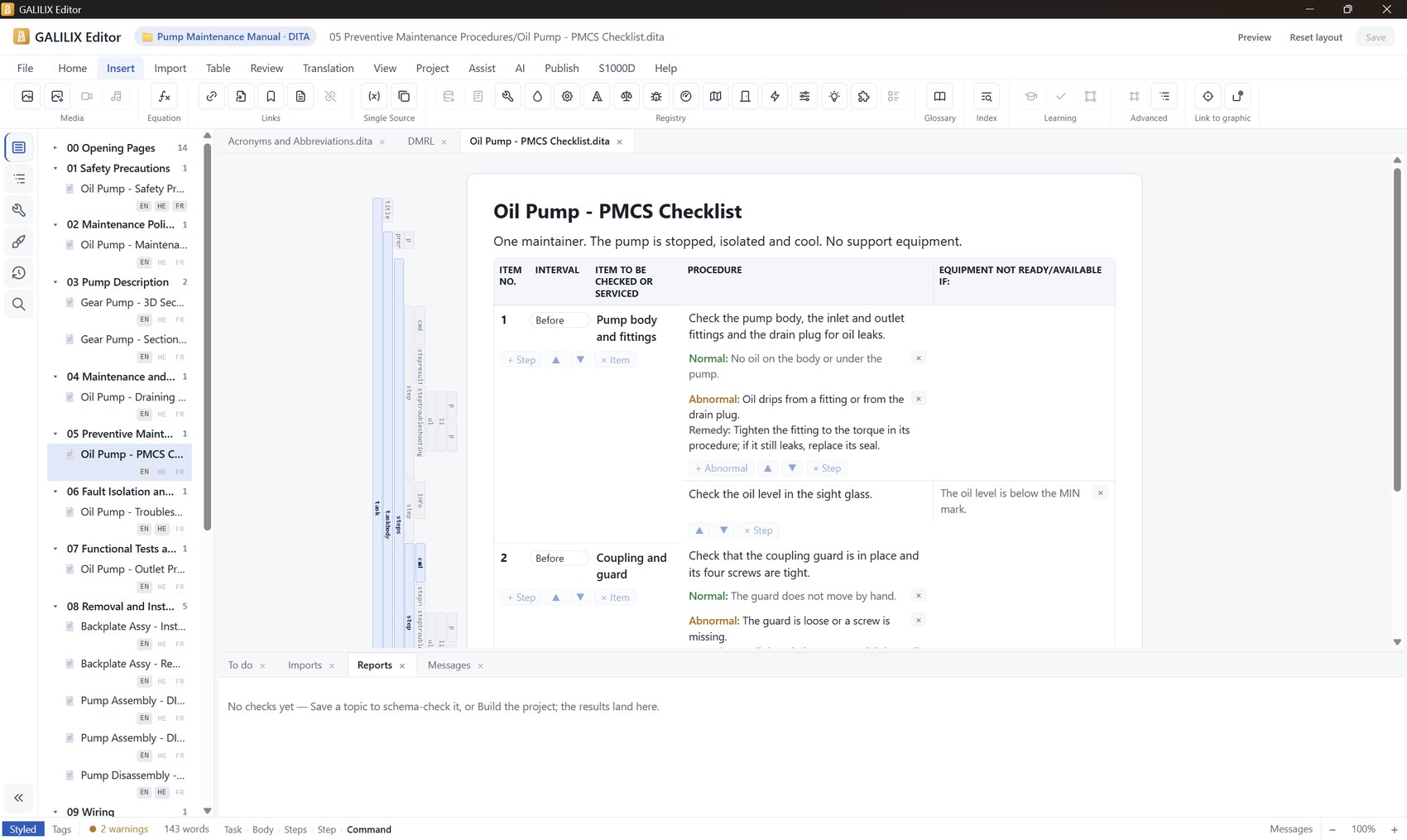
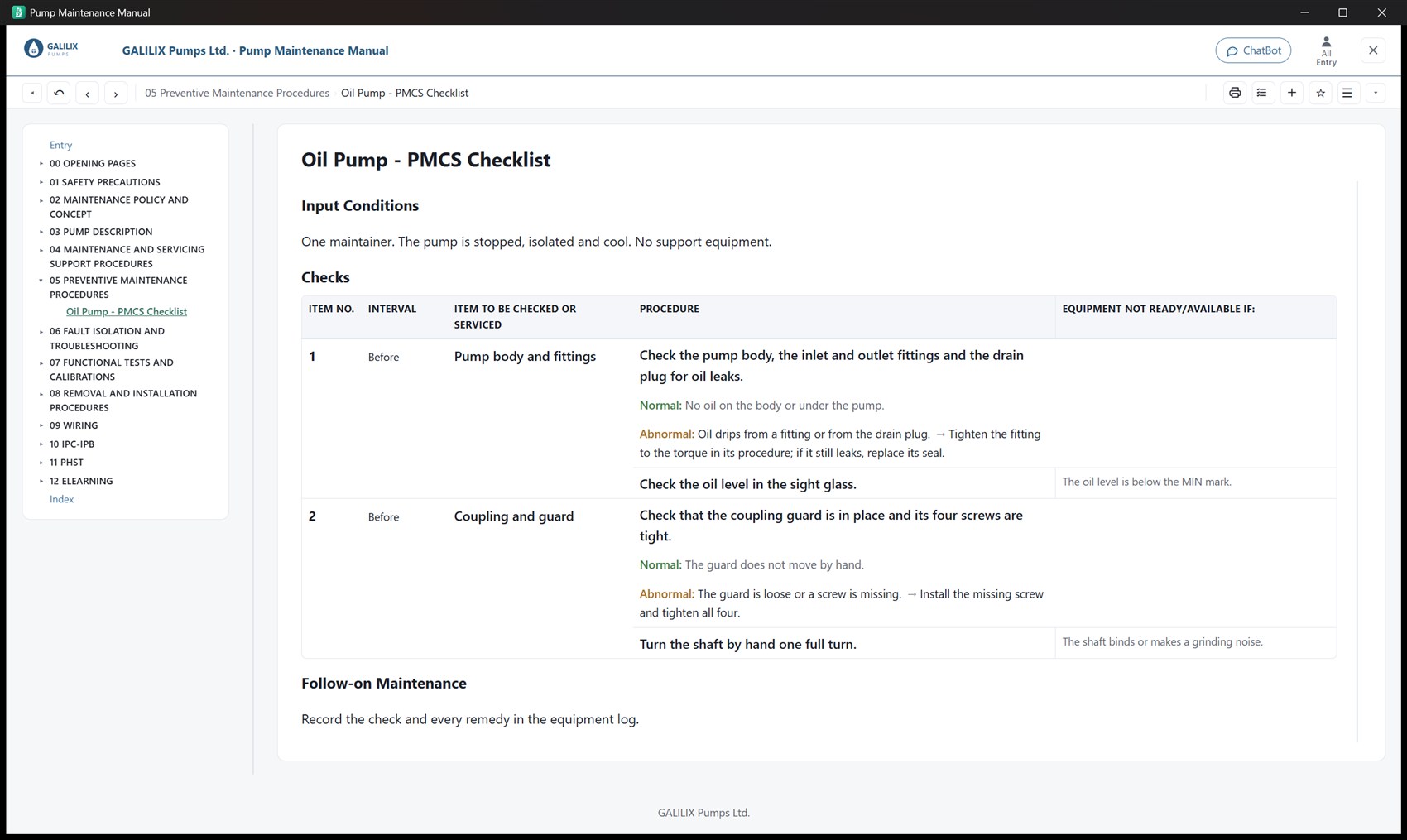
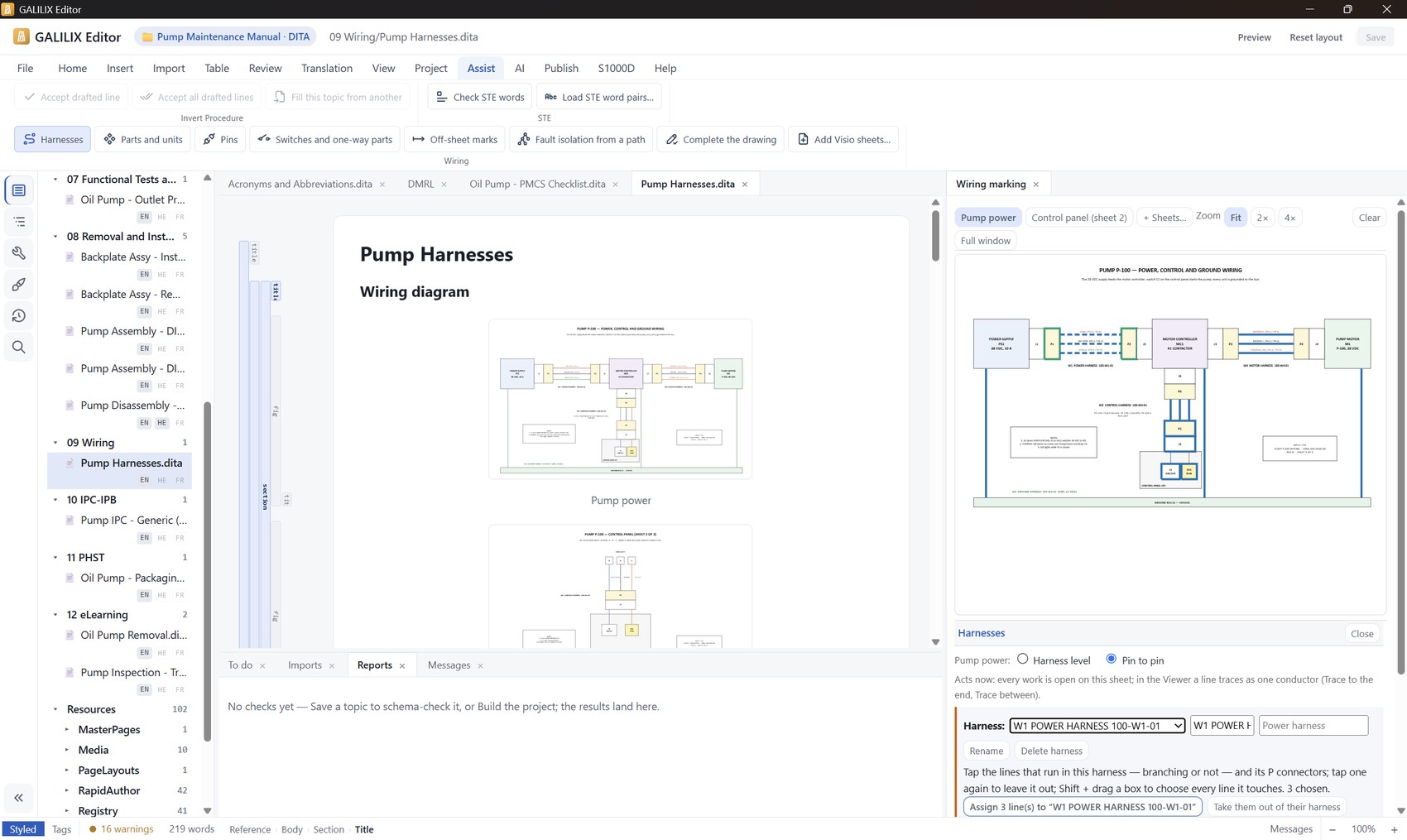
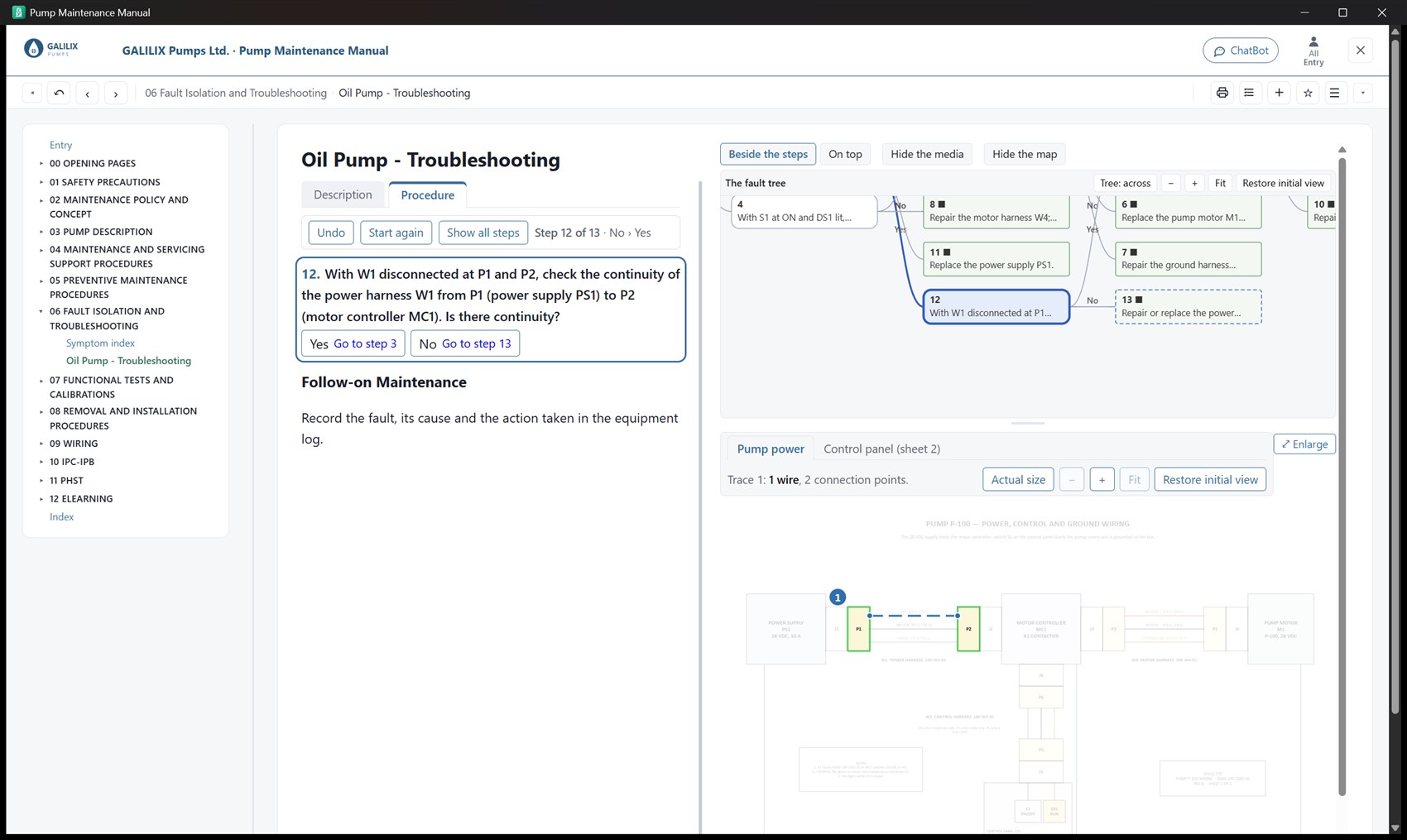
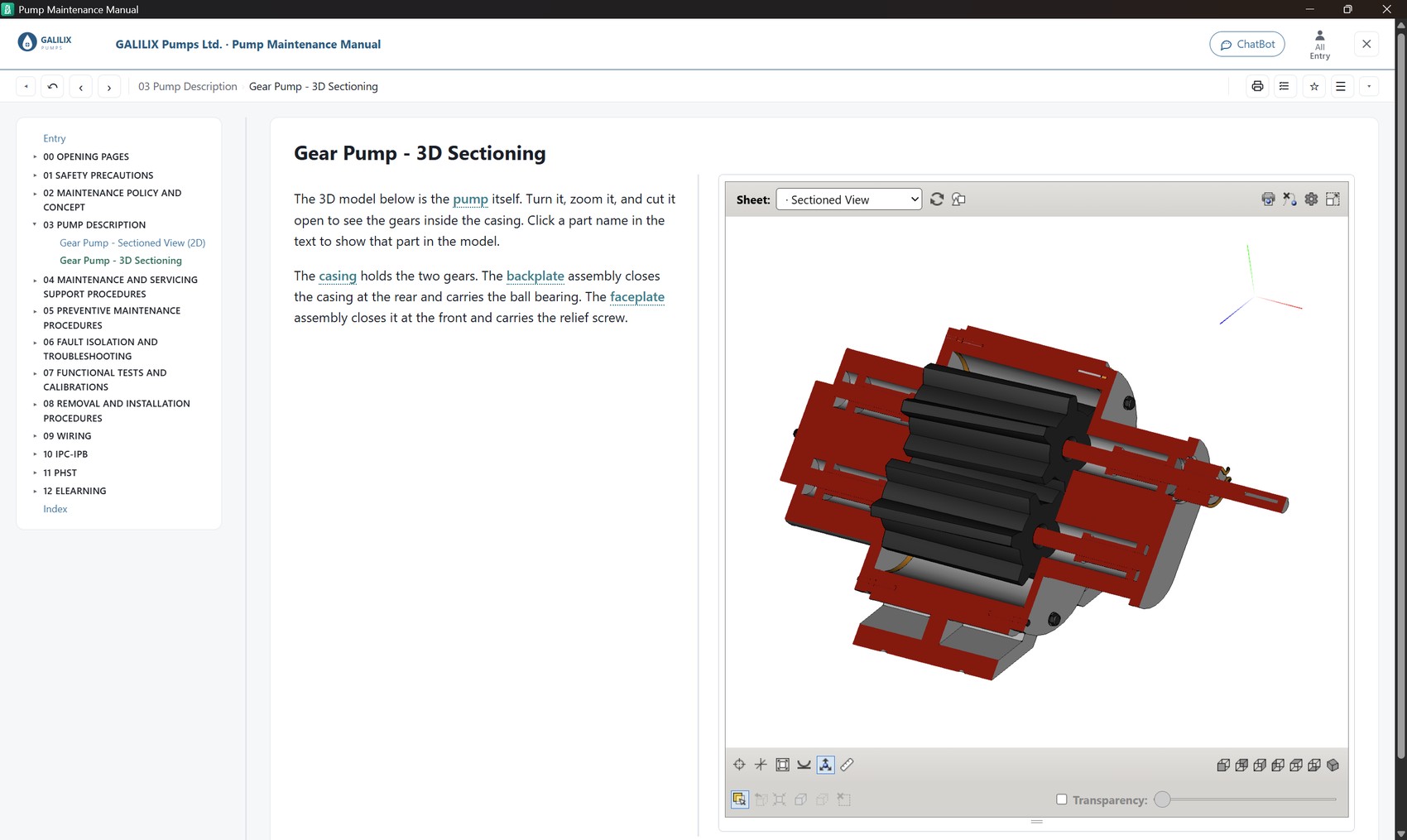
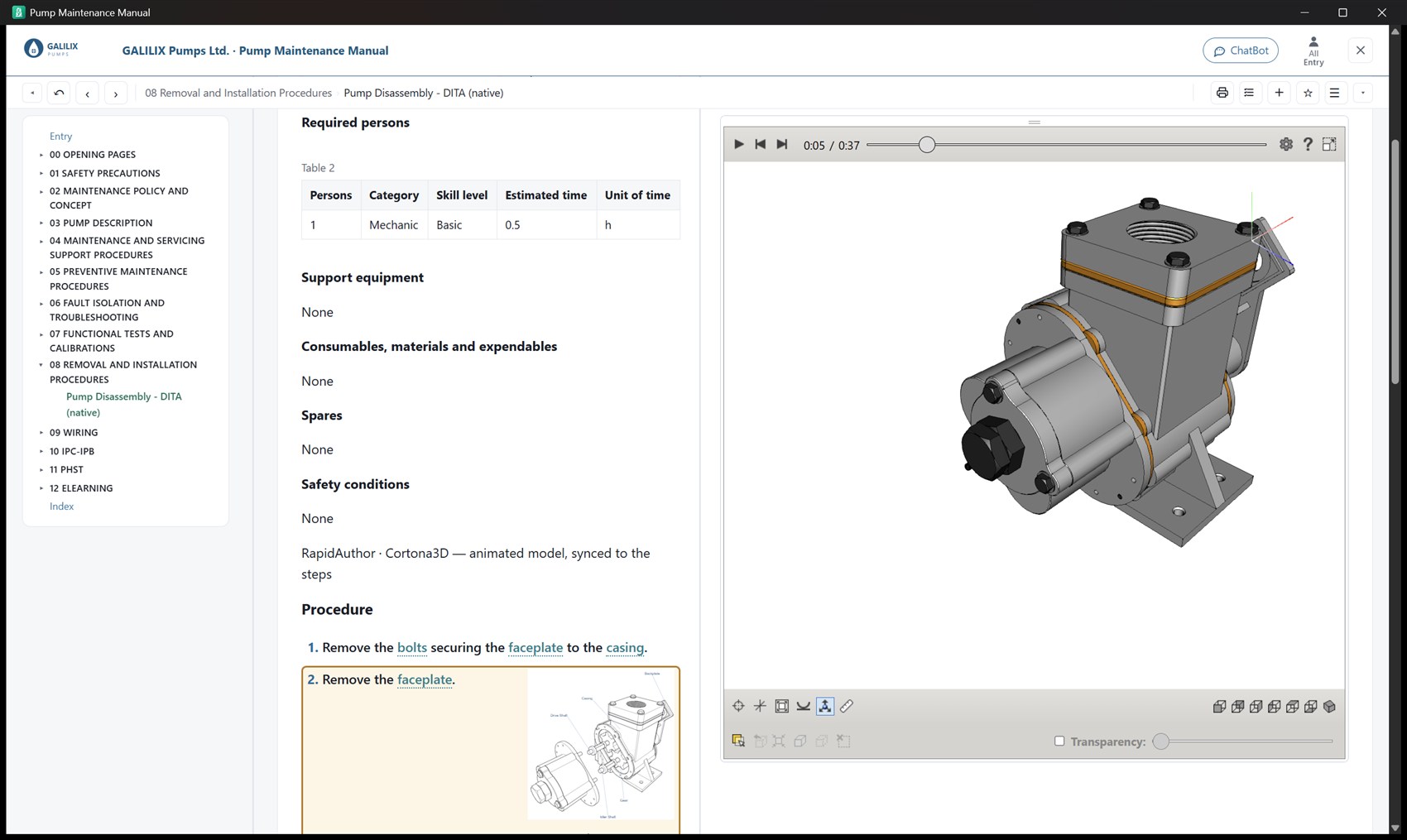
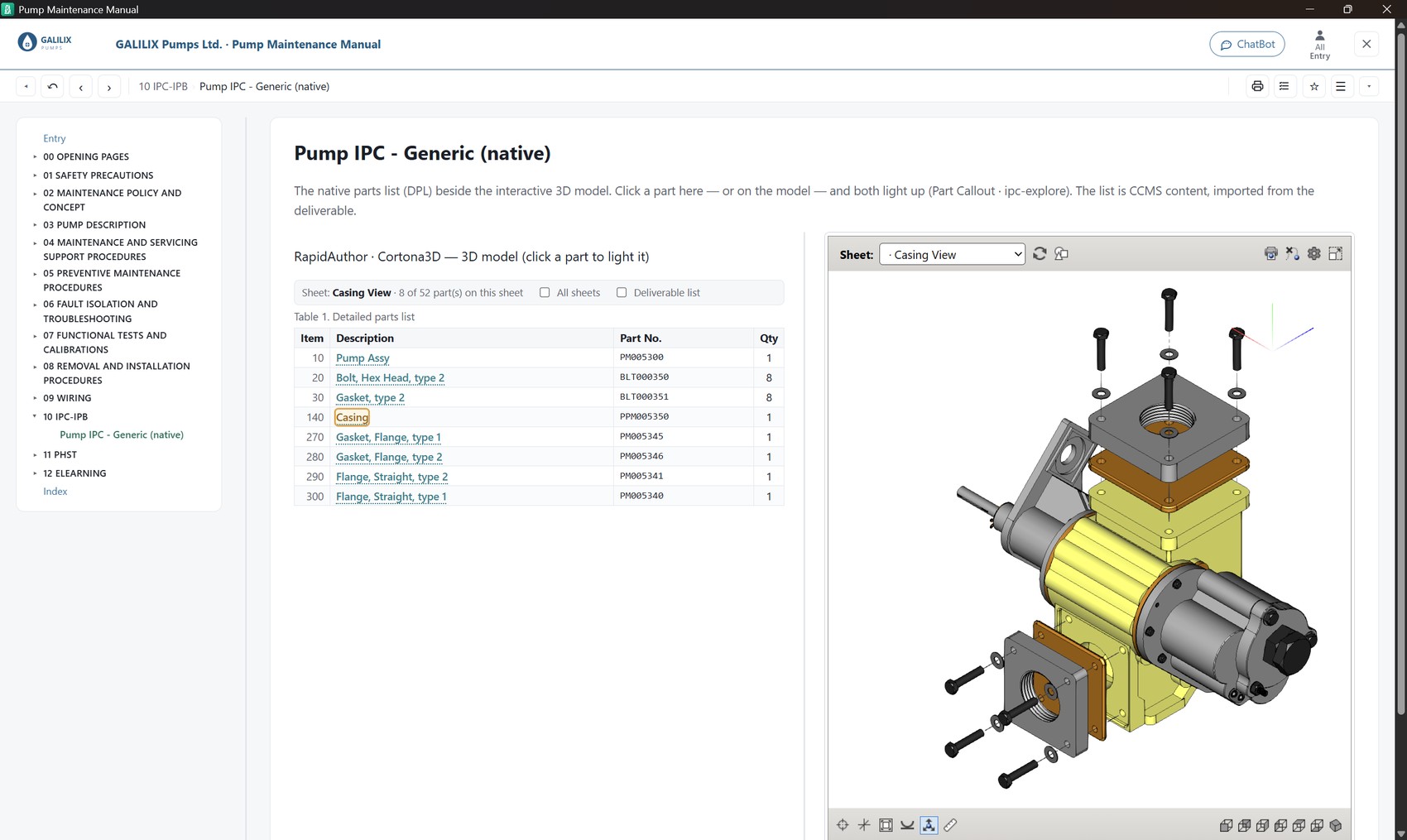
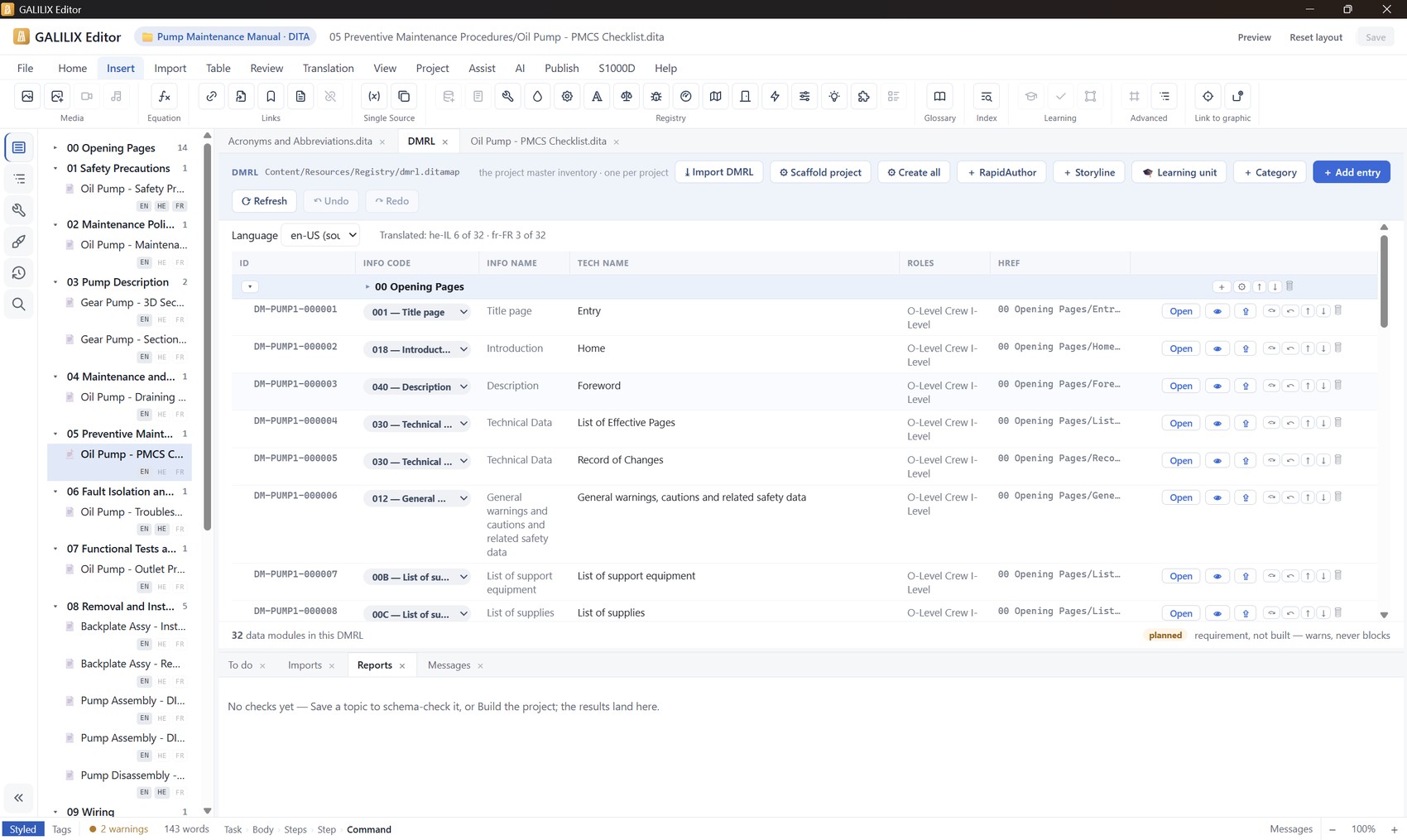
Screens of the installed programs, on the demo project. Click a screen to enlarge it.
Sample production
A sample maintenance manual is sent on request, with a GALILIX Viewer license. Leave your details on the Sample production page, and we will contact you for a demonstration.
Questions
Does GALILIX need an internet connection?
No. Installation, license activation, writing, publishing and reading all work with no network. The software sends nothing out.
Do readers need a license?
Yes. Every computer that reads GALILIX productions needs a GALILIX Viewer license, issued by Galili. The Viewer itself is not installed on the computer. GALILIX Editor is also licensed to the computer it is installed on.
Which standards does GALILIX work to?
The project is written in DITA 1.3 and published with the GALILIX publishing engine to DITA and HTML. Export to S1000D is in development. When ATA iSpec 2200 is required, or full S1000D with a CSDB and a publication module, Galili produces through RapidAuthor and Xignal.
Can we keep writing in Word?
Yes. GALILIX imports Word documents into the project and records for each topic that it came from Word. You can also publish back to Word.
How does GALILIX work with RapidAuthor?
GALILIX imports a RapidAuthor package and brings it into the production. The content of the package is not edited in GALILIX; it is only styled to match the design of the manual. In GALILIX Viewer the 3D runs from inside the production file, with no change to the reader’s computer.
Let us start with a conversation.
Tell us what you have today: a new system with no documentation yet, an old manual that needs updating, or a team that needs training. We will ask a few questions, work out what is really needed, and suggest a way of working that fits you. The conversation commits you to nothing, and we will get back to you ourselves.